

If you are marketing online then you have no doubt thought about (or tried) adding visuals to your marketing mix.
Whether you jump in to create some shareable images, or assets like SlideShare, videos or infographics – visual content gets results.
In this post, we share how 10 Brands have achieved exceptional results by trying something new or different with visuals.
Are you ready to Shake Up your marketing with visuals? Then listen to what worked for them, and try these tips for yourself!

Image by Shutterstock
There's no doubting that visual content can take your marketing to the next level. When done right you can get results and really shake up your marketing with visuals.
But I am referring to a certain kind of result. I'm not talking about just likes and comments. I'm talking about traffic, shares and SALES. But what works? And how do you get these results with so many options out there.
We asked 10 Brands to share how they “Shook Up” their marketing with visuals. This is what they said:
#1 Matthew Steele, San Diego Zoo

Matt Steele is senior social media planner for San Diego Zoo Global. He has over six years of experience in social media, and is proud to work for work for a non-profit full of passionate people working tirelessly across the world to conserve our planet's precious wildlife and habitats.
The San Diego Zoo is one of the most innovative attractions in the world when it comes to social media.
Matt shared 3 ways in which San Diego Zoo is shaking up their marketing by trying (and achieving success with) new strategies for visual content:
1 Converting Video to GIFs for Tumblr and Google+
“We started chopping up bits of our videos and making GIFs out of them to post to Tumblr and Google+. Now, our GIF posts far out perform all other post types.”
2 Uploading Videos directly to Facebook
“We started uploading our videos directly to Facebook and the view counts are dwarfing what we're seeing on YouTube.”
3 Uploading Video to Vine
“Sensing the rise of short-form video, we started uploading the most compelling bits of our video content to Vine. Now, our Vine videos have nearly double the amount of views (loops) that our YouTube videos have.”
Your Takeaway?
Get started with short-form video – in any way you can. Start uploading 15 second Instagram videos, upload snippets to Vine, upload videos direct to Facebook, or play with short Periscope videos. Get inspired by the Zoo's results!
#2 John Kapos, Perfection Chocolates

John is the Managing Director of Perfection Chocolates and Sweets. John's family started Perfection in 1939 and for the last 6 years, John has focused on expanding his business through social media.
Using platforms like Facebook, YouTube, Twitter, Pinterest and recently Periscope but he has found great success with Instagram (his favourite platform!).
Posting Great Videos and Photos to Instagram
“At Perfection Chocolates we make sure we post great videos and photos of our products. We posted a video showcasing our Easter products and we made an $1100 sale.
We also posted about our red velvet ganache truffles and 6 customers came in from this post.”

Ummm… did somebody say Easter Egg?
Oh you're back? How many days did you get lost inside Chocolate Johnny's account? ;o)
Your Takeaway? If you are not yet on Instagram, consider jumping in. Take a look at John's account for examples of how a product-based business can rock it on Instagram.
#3 Caz Makepeace, Y Travel Blog

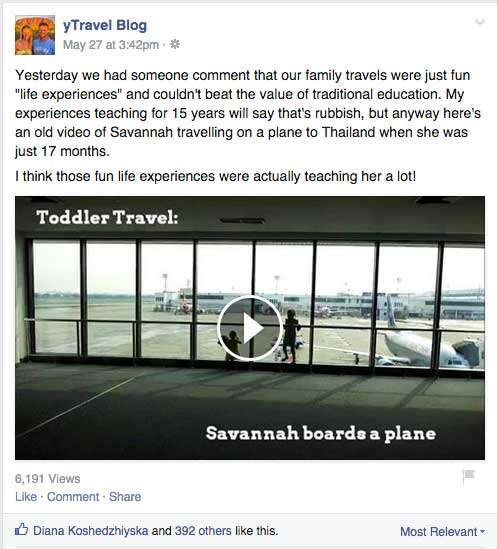
Upload Your Previous YouTube Videos Direct to Facebook
“We've been uploading videos direct to Facebook and this one has had over 6,000 video views and the biggest organic reach for the past month! Videos are really increasing our engagement!”
#4 Azure Collier, Constant Contact

Azure manages Constant Contact's Pinterest and Instagram channels and is part of a larger team that creates and manages social media content for all of Constant Contact's platforms.
SlideShare Drives Tons of Social Shares and Exposure
“We created a SlideShare with 50 Expert Tips for Getting Started on Social Media. We asked for tips from many experts and the SlideShare was featured on SlideShare and by Buffer, tons of social shares as well.
To date it has been viewed over 193K times. This has been great exposure for our brand.”
Here it is:
Your Takeaway? Jump into SlideShare! Stuck for what to create a slide deck about? Ask some experts in your industry (just like this post!) or summarize the key points of your latest blog post.
Check SlideShare's own recommendations for how to create a great slide deck here.

#5 Angelo Dodaro, Director – Top Dog Social Media

Angelo Dodaro is Director and head social media strategist for Top Dog Social Media, an award-winning digital marketing agency based out of Kelowna, BC. Angelo's content created in 2014 alone has been shared over 50,000 times across the various social networks.
1. Adding custom images with Blog Post Title

Consistently feature a header image on your posts!
2. Feature Experts on your Blog and Create Custom Quote Images
3. Tweet Images for more Retweets

Your Takeaway? There's plenty of takeaways from Angelo's tips, but start out by doing something simple. Add images to your tweets. Find out more about how to do it here.
#6 Katrina Springer, The Organised Housewife

Post a Title on the Graphic

#7 Ian Cleary, Razor Social

Create an Infographic and Feature it on a Blog Post

Click here to see the full infographic – check out who designed it!
Your Takeaway – If you are launching a product, program or service, wish to build your list or you are publishing an “epic” blog post, then consider creating an infographic. It should not just be filled with boring data, but should, if possible, expand on the information in the post, complement the blog post and ultimately attract and drive more traffic to the blog post. Always drive traffic to a platform that you own – ie your website.
#8 Ngaire Stirling, Brisbane Kids

1. Embed Printables in Your Blog Post

“We also had original Indigenous artwork designed for us to be used as colouring in for children. The result is over 10000 downloads per month”.
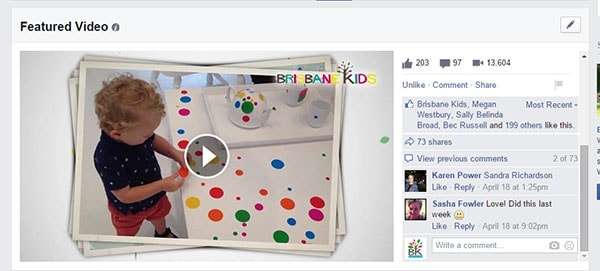
2. Upload Native Video to Facebook and Pin Video to the Top of Your Page.
“Facebook Video is showing huge results with us uploading separately to youtube (insurance) and then natively to Facebook. We pin this one on the top of our page because it send a strong immediate brand message about what we are about.”
#9 Jill Holtz, My Kids Time

Add shareable visuals to every article

#10 Donna Moritz, Socially Sorted

Yes, that's me!
So let's jump in to see how I shook things up with visuals:
Jump in and start using SlideShare
“SlideShare has been my secret “Visual Content” weapon. Presentations uploaded to SlideShare have driven quality, targeted readers to my blog, attracted thousands of views (up to 140+k on a single slide deck) and attracted hundreds of subscribers. SlideShare SHAKES THINGS UP. ”
So… I have created a SlideShare Presentation for this very blog post! Check it out below or you can visit my SlideShare profile for more.
Your Takeaway:
SlideShare can be a great platform to shake up your marketing with visuals. Start simple with a simple summary of a blog post or modify one of your presentations to suit SlideShare.
Remember that people can not see you presenting so write the slide deck as though you are taking them on a journey – help them to want to click each slide and design it so that no presenter is necessary to understand the “story”.
Over to You

Donna Moritz


