
Canva Pro Lite is a new affordable option for users as an upgrade from Canva Free and an alternative to Canva Pro. In this post we cover what it is and how you can access it as it rolls out.
DONNA MORITZ |CANVA VERIFIED EXPERT AT SOCIALLY SORTED
Posts on this blog may contain affiliate links, which means we receive a small commission at no cost to you, if you purchase through a link.
Key Takeaways
- Canva Pro Lite is an affordable upgrade option between Canva Free and Canva Pro, offering access to premium templates and design features.
- Currently available in select Asian countries, Canva Pro Lite aims to serve budget-conscious creators with essential design tools.
- To upgrade, users must check availability on their Canva account to see if it is offered in their region, and then subscribe through the Canva app or website.
- Canva Pro Lite provides features like Background Remover, Brand Kits, Premium elements and templates, and 50GB of storage, making it ideal for lighter design needs.
- This plan is suitable for users who don't require advanced AI features or full collaboration tools found in Canva Pro.
What is Canva Pro Lite?
Canva Pro Lite is a new tier of Canva that is positioned between the free subscription and Canva Pro. Please note: It is NOT currently rolled out to all users and is being trialled in some countries (such as India, Indonesia, Thailand and Vietnam). It's aim is to give users access to millions of premium templates, elements (photos, videos and graphics) and essential design features at a more affordable price than the standard Canva Pro tier. As such it's designed for budget-conscious creators around the world and is being rolled out to select regions at present (currently Asian countries).
Canva Pro Lite is suited for everyday creativity and those that need to use Canva for lighter design needs while having access to some premium content and core design tools.
Are we excited about this option being tested? You betcha! It brings more accessibility to the core Canva features that many Canva users love and use – from Background Remover to Brand Kit… without the extras that they don't need right now.
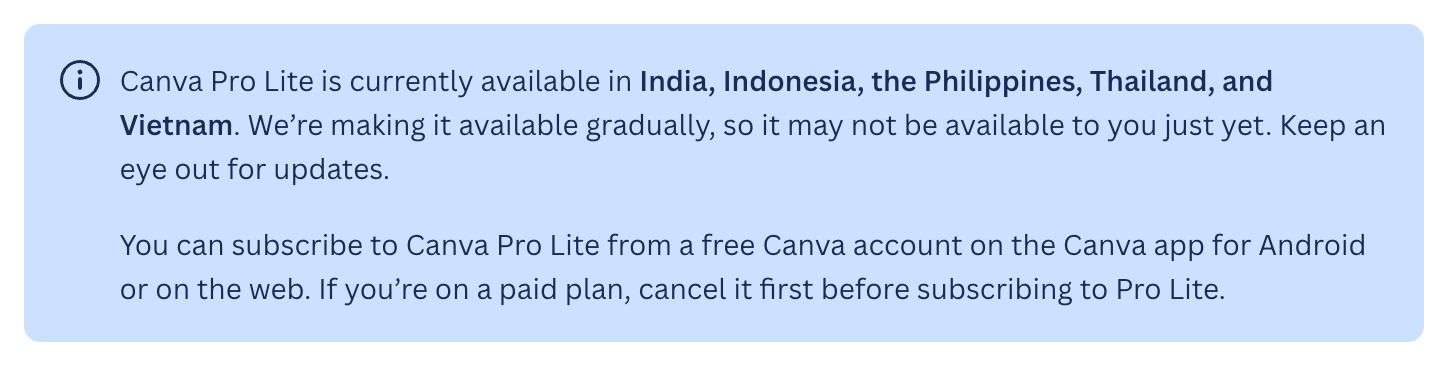
Here is what Canva has to say about availability and roll out of this new subscription plan:
How can I upgrade to Canva Pro Lite?
Canva Pro Lite is currently available in a few select countries in Asia, namely India, Indonesia, the Philippines, Thailand, and Vietnam. Canva is gradually rolling it out to other regions so it may not be available in your account just yet.
You can subscribe to Canva Pro Lite from a free account on the Canva app for Android or on the web. If you’re on a paid plan, cancel it first before subscribing to Pro Lite.
Check if Canva Pro Lite is on your account. If it's available you'll be able to follow the instructions below to upgrade:
Once you open your Canva Account do the following:
- Go to the home page and select Start your free trial.
- Select the option Canva Pro Lite > Try it free for 30 days. Note this is only available in some select areas as it rolls out.
- Note that you can choose between monthly or yearly plans based on your preference. In general annual plans will save you more with Canva (usually the equivalent of 2 months for free).
- Select Next.
- Select your payment method.
- Enter your payment details and then confirm your upgrade to Canva Pro Lite.
Start enjoying the benefits of an upgraded Canva experience!
How much is Canva Pro Lite?
Currently at the time of writing this post, Canva Pro Lite is a very new feature and pricing is not being shared publicly. It is only being offered in certain markets initially (ie Asia) as a heavily discounted alternative to the Standard Canva Pro subscription.
Pricing varies from country to country and based on currency at an affordable price point. We will update this post with more information as it becomes available.
What are the Key Features of Canva Pro Lite?
Canva Pro Lite gives you access to essential graphic design and AI tools that allow you to elevate your design skills including:
- Premium Assets: Unlimited acccess to premium templates, elements (ie graphics, fonts, audio and stock media) that are not available in the free tier.
- Basic Brand Features – 3 Brand Kits, Brand Templates and Brand Components.
- Export print-ready designs in CMYK
- Social Content Planner – Plan and schedule your content with access to Canva's content planner.
- Access to Basic AI Tools – including Background Remover, Magic Resize, Magic Eraser and Magic Grb.
- Better Storage – Get additional storage (up to 500 GB of Cloud Strorage).
Canva Pro Lite is budget-friendly and more affordable than Canva Pro. It's the perfect stepping stone for solo creators and hobbyists who don't want advanced AI features, team tools or collaboration, and don't need massive storage allowances.
The following table gives a handy comparison between Canva Free, Canva Pro Lite and Canva Pro so you can see which is a better fit for you:
Comparison Table (Canva Pro Lite vs Canva Pro)
| Feature | Canva Free | Canva Pro Lite | Canva Pro |
| Price | Free | Pricing varies depending on region or country/currency. Reports indicate it's 50-60% discount on Canva Pro pricing. | Paid monthly or yearly after free trial – $18/mo or $144/yr USD (discount of $72 if paid annually) |
| Number of Users Included | 1 user | 1 user | 1 user |
| Templates | Restricted selection of Templates. | Everything in the Free plan PLUS access to all premium templates in Canva's library. | Everything in the Free plan PLUS access to all premium templates in Canva's library. |
| Element library (ie photos, videos & audio) | Restricted selection of elements. | Full access to Canva's premium photos, videos, graphics, and audio library. | Full access to Canva's premium photos, videos, graphics, and audio library. |
| Magic Studio AI Tools | Not included. | Includes select Magic AI features including Background Remover, Magic Resize, Magic Eraser and Magic Grab. | Access to all Canva Magic AI Tools. |
| AI Creation Tools (Shared AI Allowance) – including Canva AI, Magic Write, Photo/Video Animations, AI Voice. | Up to 200 uses for Standard AI tools or 20 uses for Premium AI tools (no access to Ultra Tools) | Same access as Free accounts. | Up to 2000 uses for Standard AI tools or 200 uses for Premium AI tools and 20 uses for Ultra tools). |
| Background Remover (images/videos) | Not included. | Includes Background Remover for Images and Video | Includes Background Remover for Images and Video |
| Brand Kits & Brand Controls | One basic Brand Kit (limited to 3 colors only). Logos and fonts not included. | Includes up to 3 Brand Kits to manage your logos, fonts and colors. | Includes up to 5 Brand Kits plus the ability to upload custom fonts and stronger brand controls. |
| Brand Templates | Not included. | Includes ability to create reusable, on-brand designs with Brand Templates | Includes ability to create reusable, on-brand designs with Brand Templatesd |
| Brand Components | Not included. | Includes Brand Components – turn static assets into intelligent, reusable Components | Includes Brand Components – turn static assets into intelligent, reusable Components |
| Storage | 5 GB of Cloud Storage | 50 GB of Cloud Storage | 100G of cloud storage allowing for heavier, ongoing design work. |
| Export Formats | Standard Formats only (ie PNG, JPG, Standard PDF) | Same as Free plus export print-ready designs in CMYK | Advanced print-ready exports including PDF print, and CMYK print options. |
| Social Content Planner | Not included. | Includes Built-in Social Content Planner to plan and schedule content to social media platforms. | Includes Built-in Social Content Planner to plan and schedule content to social media platforms. |
| Check for Canva Lite | Try Canva Pro |
Please note that while Canva Pro Lite is being rolled out to select countries, these inclusions and features may vary. We will update this post as more information becomes available.
As you can see, Canva Pro Lite is a significant step up from the free plan in terms of access to basic Brand Kits/Brand Templates/Brand Components, the entire Canva element and template libraries, more storage, Social Content Planner, Background Remover (and other basic AI tools like Magic Resize and Magic Eraser). For many Canva users, this is all you need!
Let's break down what you get in this new subscription in a little more detail:
What AI Tools can you access?
With Canva Pro Lite, you get access to some basic premium AI tools including:
- Background Remover (Photo & Video)
- Magic Resize
- Magic Eraser
- Magic Grab
It doesn't include other tools like Magic Edit, BG Generator, Magic Expand, and Grab Text currently.
But who doesn't love access to Background Remover? This tool alone makes it worth the upgrade.
Note: AI Creation Tools allowance is the same as for Canva Free Accounts.
What Brand Tools are included?
Surprisingly, Canva Pro Lite gives you some pretty decent Brand Features. We love brand features! With Canva Pro Lite you get access to:
- Brand Kits – Manage your logos, colours, and fonts with up to 3 Brand Kits
- Brand Templates – reusable, on-brand designs with Brand Templates
- Brand Components – create static assets into intelligent, reusable Components
The inclusion of so many Brand Tools like Brand Kits and Brand Templats is pretty exciting for Canva users – especially those that couldn't afford the full functionality of Canva Pro.
How Much Storage do you get in Canva Pro Lite?
Canva Pro Lite is a step up from the free plan in that you get access to 50GB of storage for your growing business. For many Canva users this is a deciding factor as they need more storage, especially as their business grows.
How can I downgrade from Canva Pro or Canva Business to this new subscription?
Yes, it is possible to downgrade to Canva Pro Lite although it is likely you need to completely cancel your current Canva Pro or Canva Business subscription first. You'll also likely need to wait for that subscription to expire. In doing so, you'll revert to a free account first before you can upgrade again to Canva Pro Lite. As this a new subscription level, Canva is still updating their help doc information.
Important: we recommend making sure that Canva Pro Lite is available in your region first before cancelling any current subscription.
Canva Pro Lite is a middle-tier plan and as such it's not possible to move between an existing plan and Canva Pro Lite (at the time of writing this post). If you have difficulty cancelling your current plan then subscribing to Canva Pro Lite then reach out to Canva Support for help. Again, make sure that it is available in your region first before proceeding.
I can't see Canva Pro Lite as an option in Canva
Again, Canva Pro Lite is currently being rolled out as a new mid-tier subscription option for Canva users. As such, it's only available in a few select countries in Asia at the time of writing this post – currently Vietnam, Thailand, Philippines, Indonesia and India.
You can subscribe to Canva Pro Lite from your free Canva account on desktop/web or the Canva app for Android. At the time of writing it is not available onn Canva app for iOS so if you are using an apple device, try checking desktop or laptop to see if it's available for you.
Who might benefit from Canva Pro Lite?
We are excited about Canva Pro Lite as a subscription option and it being rolled out in test countries around the world. Why? Because it brings essential Canva tools to more people, making it more affordable.
In short, it's the basic version of Canva Pro and is perfect for those that don't want the Bells and Whistles – they want to use Canva for designing with premium elements without the additional AI features. We hear this all the time from our community, that many Canva users just want the essential tools to design and don't need everything in Canva Pro.
Check your account to see if you have Canva Pro Lite enabled yet:
Who is it not suited for?
If you use Canva for work or business and need all the features, then Canva Pro Lite might not be for you. For example, if you design more regularly or need advanced AI capabilities (with higher AI limits) and require the full and the full premium Canva experience, then Canva Pro may be a the better fit for you.
Wrapping it up
We love that Canva is offering a more affordable solution for small business or Canva users who need more than what they can get on a free plan but not everything that is offered in Canva Pro. Canva Pro lite will be a better option for many that don't want all the additional AI features in Pro and Business.

Donna Moritz
