


Is Canva Pro Worth It? In this Post we share why Canva Pro is worth it and who it is best suited for, including pros and cons for upgrading so you can create amazing visuals in your business.
DONNA MORITZ | PUBLISHED 10 JANUARY, 2026
Posts on this blog may contain affiliate links, which means we receive a small commission at no cost to you, if you purchase through a link.
Canva Pro is feature-packed with so many tools that make creating visuals so much easier at a professional level. In this post, I'll help you decide if Canva Pro is worth it for your business and whether you should upgrade from Canva Free.
Ready to see why Canva Pro is worth it? Let's get into it with some key takeaways before breaking it down:
Key Takeaways
- Canva Pro is the most affordable paid version of Canva that gives you access to premium elements and features.
- You can access Canva Pro with a free trial, via an Education account or a Non-profit account. You can also access it by being invited into a Canva Pro team.
- Canva Pro is suited for Canva users who need professional visuals for work or business.
- Canva Pro is less suited for Canva users who are only using Canva causally or for personal use and don't care about additional features for assets and productivity.
- Canva Pro includes premium features, elements and assets, AI features, more storage, a full range of professional download quality, additional storage and collaboration tools as well as a content planner.
- Canva Pro can save your tech stack spend on other tools as you no longer need to pay for presentation software, whiteboard tools, AI writing and image tools, background remover tools, photo editing tools and more.
- Canva Pro is more affordable if you choose the annual plan (approximately $120 USD per year at the time of writing this post, compared to $15 USD per month for monthly payments.
Now that we've covered the basics, here's a deeper dive into Canva Pro:

Is Canva Pro worth it? Let's Break it Down
Full Disclaimer: I am a Canva Verified Expert and a Super Creator of templates for Canva. But … I am also one of Canva's earliest users (user #358 at your service), and I have trained tens of thousands of Canva users since 2013.
So I have some idea {wink} about the types of users that benefit from Canva Pro and who can stay on Canva Free and still be happy. Here's the breakdown:
Who is Canva Pro for?
Canva Pro is worth it for users who are publishing content weekly or even daily. It's ideal if you create designs on a professional basis either for work or for business or for clients as a designer, content marketer, social media manager or virtual assistant.
Canva Pro users also care strongly about brand consistency so will use Canva to create “on-brand” visual content. They also value productivity and being able to create content at scale, so benefit from advanced AI features, as well as social scheduling tools and the ability to collaborate with others within Canva.
Does this sound like you? Then you should check out Canva Pro for free on my trial link:
Who is Canva Pro not for? (or who should use Canva Free)
You're probably better suited to stay on the Canva Free plan if you are only creating designs casually and for personal use. Or if your design volume is very low and you don't require your visual content output to be of print quality or high resolution.
You're an ideal Canva Free user if you're not bothered by watermarks on your content or only being able to access limited assets. In short, the ideal Canva Free user is using Canva for occasional personal use and doesn't need it for work or business.
Key features of Canva Pro
Let's dive into the key differences between Canva Pro and Canva Free as well as a detailed breakdown of each of the features that you should be aware of when considering the question “Is Canva Pro worth it?”.
Comparison Table: Canva Free vs Canva Pro
Just to make it super easy to compare, we've narrowed down all the Canva Free vs Canva Pro features into a simple, no-fuss table for you. Need more detail? Keep reading below:
| Feature | Canva Free | Canva Pro |
| Price | $0 – free forever | Paid monthly or yearly after free trial (best value on annual plans) $15/mo or $120/yr (USD) |
| Number of Users Included | 1 user | 1 user |
| Templates | Large library of free templates across most formats | Everything in Free PLUS a much bigger library of premium templates |
| Stock photos/videos/audio | Access to a limited set of free stock content. | Full access to Canva's premium photos, videos, graphics, and audio library. |
| AI Tools (Magic Studio & more) | Basic access with lower usage limits. | Extended access and higher/unlimited limits on AI tools like Magic Design, Magic Write etc. |
| Brand Kits & Brand controls | Can upload up to 3 colors but logos and fonts can't be saved to brand kit. | Multiple brand kits, custom fonts, brand templates, and stronger brand controls. |
| Storage | Limited cloud storage (good for light use) | Much larger storage allowance for heavy, ongoing design work. |
| Export formats | Standard formats only (eg PNG, JPG, basic PDF) | Advanced exports including PDF Print, transparent backgrounds and more control. |
| Print-ready/CMYK options | Limited or not available for some use cases. | Designed with print-ready exports and pro-quality output in mind. |
| Background Remover (image/video) | Not available or very restricted. | Full access to one-click background remover for images and video. |
| Social media scheduling | Not included | Built-in content planner and social media scheduling to multiple platforms. |
| Collaboration Tools | Basic sharing and commenting | Shared brand workspace, templates, approvals and better team collaboration. |
| Support response time | Standard support with slower response times. | Priority support with faster responses on paid plans. |
| Start using Canva | Try Canva Pro |
OK, now that we've covered the basics, let's take a deeper dive into Canva Pro features to love (and upgrade for!). Many of these features we use daily with our team and I know my community loves them too, making an upgrade to Canva Pro a no-brainer if you use it for work or business:
1. Premium Canva Templates

With Canva you can easily start with a blank canvas. Or you can use one of Canva's templates to get started (the easy way). Yes, you get thousands of templates in Canva Free but with Canva Pro you get premium templates. Millions of them.
Canva has templates for everything from whiteboards to presentations to socail media to carousel posts to Canva docs to mobile video to stickers to cards to printables and more. You'll find a template for just about every use case.
2. Premium Media Library (Assets and Elements)
With Canva Pro you get the whole kit and kaboodle. Every element in Canva. We're talking millions of illustrations, graphics, photos, audio, video and more. You'll find everything you need to design.
No watermarks. No limits. With so many elements at your fingertips there'll be no more hunting around through multiple stock photo sites – because everything you need is in Canva. It's a huge time saver if you're creating content regularly for social media, blogs, courses or clients.
As Canva puts it… never pay for another image again!

3. Advanced Brand Features – Brand Kit, Brand Templates and Brand Protections

This is where we get excited about Canva Pro – it's perfect for staying on brand.
Canva Pro lets your entire team stay on brand with the following:
- Brand Kits – that can be set up in minutes including access to Brand Logos, Fonts (including custom fonts), Colors, Icons, Illustrations, Photos and more.
- Brand Templates – have your internal team designer or external designer (or talk to us!) help you to create Brand Templates for your team. This feature is only available in Canva Pro!
- Brand Protections – lock down what your team can and can't do, from accessing elements and templates to which colors and fonts they can use.
- Brand System – Canva's new “Brand System” gives you additional AI-driven and organisational features like AI Powered Brand Kits and Brand Guidelines at your fingertips in the Brand Kit.
And there's other features that allow you to take your brand content to the next level, including Magic Translate (which allows you to translate your content into over 100 languages) and Magic Studio at Scale (which allows you to create campaign visuals at scale with features such as bulk background removal via Magic Sheets).
4. Premium Sharing Options
Canva Pro gives you advanced sharing options that you don't get with Canva Free, including:
- The ability to share Canva designs as template links with others – from clients to team mates to your community. Create template links so they can open a fresh version of your design without impacting the original design file. Note that Canva Free users can no longer share template links but free users can access template links and use them.
- Ability to download premium formats – with Canva Pro you can share beyond just the JPG, PNG and Standard PDF formats. You can also download Print-quality PDF Print Formats or download PNG format with transparent backgrounds, plus formats like SVG and CYMK printing.
5. Premium Canva Magic AI Tools
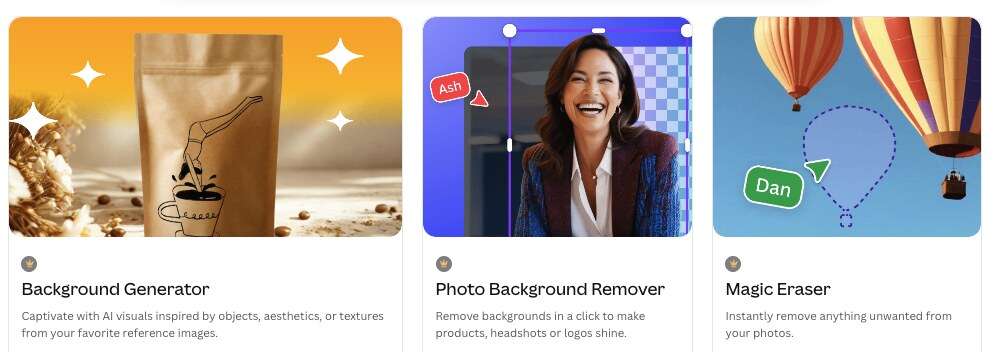
Canva Pro gives you access to all of Canva's Magic AI features including the full Magic Studio. Some AI features are free in Canva including Magic Write and Canva Magic Design for templates. But if you want to save time and take advantage of all the AI features… Canva Pro is your best friend. Let's start with the photo editing tools that use AI:
Canva AI – Magic Image Editing Tools
- Background Remover – we use this every day! It allows you to instantly remove the background from images (or videos) – even photos with curly hair don't stand a chance against this tool. It's quality and accuracy never ceases to amaze!
- Magic Eraser – this feature allows you to remove unwanted objects or people from your photos.
- Magic Edit – with Magic Edit you can easily add, modify or replace any part of an image using just a simple text prompt.
- Magic Grab – taking Magic Eraser a step further, don't just erase the element… move it! Magic Grab allows you to highlight and “grab” or select any object in a photo and separate it to its own layer so you can easily resize it or reposition it. A great use for this is to create blank space to add text or other content on your design.
- Grab Text – Grab any text and change it to an editable text box. This works best for simple fonts and clear, aligned text.
- Background Generator – create instant professional backgrounds to showcase your product images and more.
- Magic Expand – if your photo doesn't quite fit the format you want, then use this feature to expand the background to make it fit, using AI technology.
- Text to video – with a simple prompt, turn your idea or concept into a video.
- Magic Switch – this tool allows you change any design to a different format or shape (ie turn a mobile video into a landscape video or an instagram post into a Pinterest Pin).
Ready to try Canva Pro – use my free trial link to get started and take it for a test run:
Canva AI – Premium Video Editing Tools

Is Canva Pro worth it? You bet, when you use Canva's Premium Magic AI tools for video. Video creation and editing has never been easier. Check these out:
- Magic Video – round up your video clips and drop them into Canva's Magic Video using the mobile app and add your prompt. Canva will create an on-trend video for you.
- Video Background Remover – perhaps the most popular of Canva's AI video tools, this allows you to remove the background on a video in a single click. It's surprisingly accurate too, even for detailed foreground items.
- Highlights – a relatively new feature in Canva Pro that lets you create mobile videos by pulling AI-powered highlights from your longer video. Canva does all the grunt work for you.
- Captions – if you need to add captions to your video, then this feature allows you to do so in a couple of clicks. You can then choose from a selection of animations to animate your captions.
- Premium Video Templates – are available in the library. Canva Pro gives you thousands more to choose from.
- Premium Music Library – access premium audio soundtracks to add to your videos with Canva Pro.
6. More Storage
This small but mighty feature of Canva Pro is not really noticeable unless you don't have it. It quietly sits in the background making your workflow easier. Yes, you get way more storage with Canva Pro (100GB) vs the free plan (5GB).
7. Social Media Content Planner
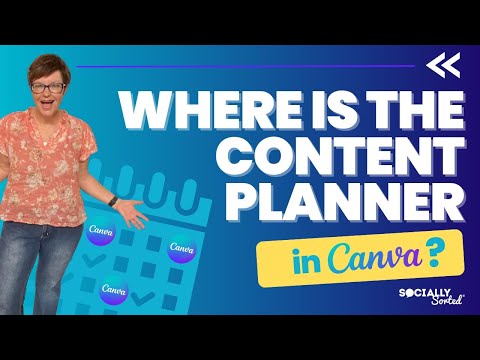
Many people don't realise that Canva has a built in Content Planner – only available in Canva Pro. This allows you to plan and schedule posts directly from within Canva. It includes a calendar view to allow you to view your entire schedule and also find suggested templates to match particular days or events.
It's a great feature for batching content and keeping consistent with your social media posting. Not sure about where to find it? Check out the video below.
8. Priority Support
Support is also something you don't miss until you need it. If you have something that needs addressing quickly, a Canva Pro account will definitely be worth it for the ability to reach out to Canva's team by chat or email.
All of these features above will save you time and help you create on-brand visuals quickly and easily, even if you are a non-designer. Whether you are using Canva for work, for your business or a serious side hustle, Canva Pro is worth it!
9. Save on other Tech Tools
This is less of a feature and more of a reason to move to Canva Pro. If you upgrade to Canva Pro then you can drop a lot of other tools in your tech stack including presentation software, whiteboard software, AI writing/image-creation tools and social media schedulers. Is Canva Pro Worth it? When you realise you can save on other software and roll it all into one product… then heck, yes it is!
How much is Canva Pro? What will Canva Pro cost?
Canva Pro is designed for solo users such as creators, business owners or freelancers as well as marketers who want all the features for work in Canva. Prices are approximately as follows at the time of writing this article:
1. Canva Pro – Monthly Billing
Monthly billing for Canva Pro requires you to play month by month. The benefit of this is that you can cancel at any time as you are no locked into a contract. Pricing for Canva Pro (monthly) is approximately $15 USD per month.
2. Canva Pro – Annual Billing
Annual Billing for Canva Pro is a significant saving at approximately $120 USD per year (compared to monthly billing). Check the pricing page for your local currency conversion. It's the best plan for your money.
Note: you can save on Canva Pro by using annual billing, watching for deals and promos (we share them on our socials) or by accessing Canva Pro via a legitimate Education or Nonprofit account (see below).
Or get started with a free trial to check it out for yourself for 30 days on my link:
4 Ways to Access Canva Pro for Free
Now that you're probably decided that Canva Pro is worth it, it's time to try it out. You might be in luck as depending on your situation, as Canva Pro doesn't need to cost you a lot. Check if you can use one of these 4 methods for accessing it:
1. Access a free trial of Canva Pro
My free trial link unlocks all of Canva Pro's features so you can have the full experience for 30 days. This is available for new users for Canva (although occasionally they will offer repeat trials for existing users). You will need to provide credit card details but Canva will usually check before charging (or cancel before the due date to be sure). Hint: You'll probably want to continue {wink}.
2. Canva Pro for free for Nonprofits
Are you a Nonprofit? If you are then you can access all of Canva Pro's features via the Nonprofit program where Canva gives up to 50 seats to NGOs on a complimentary basis. To qualify you'll need to apply on this page and provide your registered nonprofit or charity status including official documentation (like registration number, government or charity listing or similar proof).
You'll get all the Canva Pro features at the level of Canva Business which provides some additional features not available in Canva Pro (equivalent to the previous version called Canva Teams). If you need more than 50 seats on Canva Business you can acquire them at a 50% discount with a Nonprofit account.
3. Canva Pro for Free for Educators and Students
Teachers and Students can access Pro-level features via the Canva Education program where a special education-focused version of Canva Pro is available for all educational facilities (even district-wide). You can apply here.
Canva Education is a special version of Canva that gives K-12 teachers, schools and many educators free access to a Pro-level set of tools specifically designed for education. You'll get access to similar features mentioned above as well as ready-made classroom templates, lesson plans, posters, presentations, worksheets, and more. You also access premium images, graphics, fonts and elements tailored specifically for learning.
Teachers manage everything – including their classrooms, from a central dashboard. All content is licensed for educational use for lessons, assignments and school projects (but not for commercial use). The focus is on classroom use and school communication.
4. Access via an existing team account
If you're lucky, another way to access Canva Pro is to be invited into a legitimate team account – via your business, employer, workplace or client. This allows you to join their team and access all pro features (at their expense as they pay for your “seat”). You are effectively getting Canva Pro for free but remember that this is not your personal account so all of your designs stay in the team account when you leave – unless you copy them to another account.
Note that this does NOT apply to illegal “lifetime accounts” where team owners sell team “seats” to teams or even illegally set-up education accounts. Do not join a team that you are not personally associated with and where you don't know and trust the owner/admin of the team. The owner of any team can remove you at any time (and your content) and if they are using an illegal account they can be shut down by Canva.
In Summary
Is Canva Pro worth it? Yes it is, if you are using Canva for business or work, then the features and productivity gains in Canva Pro will definnitely be worth it for you. Let us know how you use it and reach out if you need training for your business or team.


Donna Moritz


